

Only the organization’s administrators and owner can deploy a routine. If you’re a member, share it in Discovery or ask an administrator: they can use it from the card, then deploy their routine.
1
Choose who
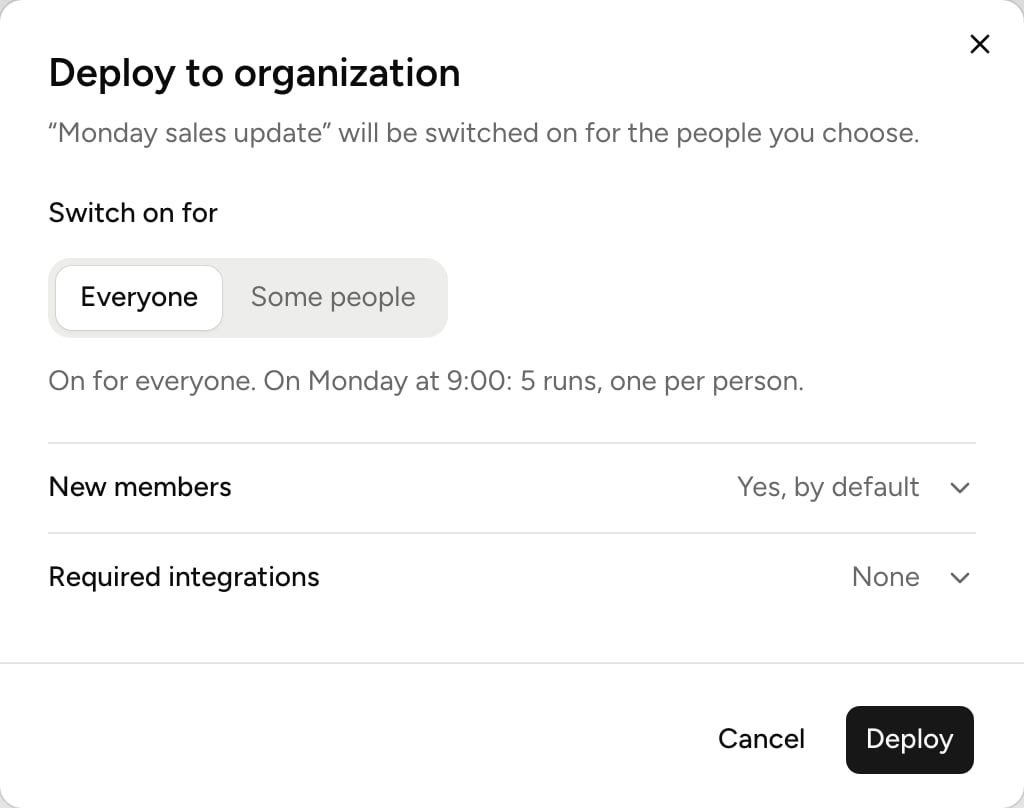
In Switch on for, pick Everyone or Some people. With Some people, check colleagues one by one or whole groups. A group adds its current members, not people who join it later. You always keep the routine: You already have it.The summary at the bottom says how many runs that makes: one per person, each time it’s set off. Each one uses credits. See Credits and billing.
2
Decide for new members
New members switches the routine on for people who join the organization later. By default, that’s yes if it’s on for everyone, no otherwise. Pick Yes or No to decide yourself.
3
Name the required integrations
In Required integrations, Balt checked the ones the routine uses. Check others if needed: each person will know what to connect. For a routine that reads a calendar or email, Calendar or mailbox accepts Any calendar or Any mailbox: Outlook and Google both work.
4
Deploy
Click Deploy. The routine is switched on for each person chosen.
What each person gets
Each person gets their own routine, with the same instructions. It appears in their Organization tab, under By your organization.- It runs for them: on their clock, with their integrations and memory, and in their language. “Every Monday at 9:00” means 9:00 wherever each person is.
- It answers them: a direct message becomes theirs, a channel stays the same if they’re in it, otherwise the result goes to their email.
- It waits for what’s missing: if the person hasn’t connected a required integration, the routine stays switched off and they’re told. It starts once the integration is connected.
- It’s locked: the person can’t change or delete it. They can still pause it and choose where it answers. Your own routine stays editable.